Why offline matters
Calendar timings are most needed at exactly the moments when a connection is least reliable: before dawn for Fajr, during travel, at a temple or a dargah with weak signal, at a family function in a village, or abroad without data. An app that has to ask a server “what is today’s Rahu Kaal?” stops being useful the moment the network does.
OIOA is designed the other way round. Calendar calculations run on your phone. There is no daily API dependence: the app does not need to download today’s timings before it can show them.
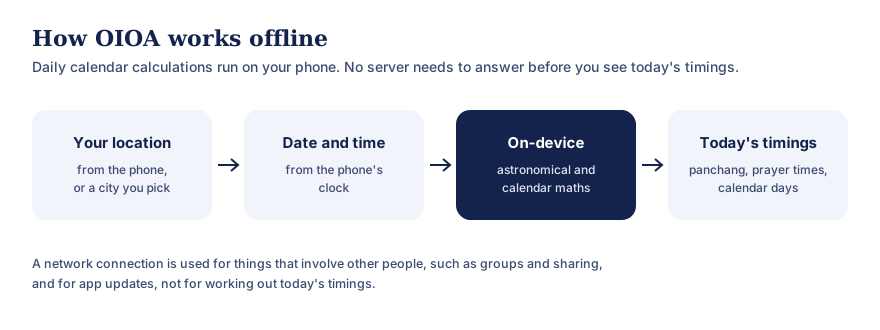
Text version of this diagram
- Your location, from the phone or a city you pick.
- The date and time, from the phone’s clock.
- Astronomical and calendar calculations, run on the phone.
- Today’s timings: panchang, prayer times and calendar days.
A network is used for things involving other people, such as groups and sharing, and for app updates.
Your dates first, not just English dates
Many calendar apps start from the Gregorian month and add a festival or two on top. For most Indian families that’s back to front. The date that decides a fast, a birthday kept by tithi, a Gahambar or a Sangrand is the community date, and the English date is the one you look up afterwards.
In OIOA, every community calendar has a month view in its own months: Hindu lunar months (Amanta or Purnimanta) or regional solar months, Jain months by sect, Islamic months, Parsi months, or Nanakshahi months. One tap switches to English months when you need them, and each day shows both. Day details, observances and your own notes all hang off the community date. See calendars in your community’s months for the full list of systems and methods.
You can even set a personal note to repeat every year by the community date, so a tithi birthday or a Roj/Mah anniversary comes round on the right day. See reminders and personal events.
What works offline
Calendars and timings across every community:
- the Hindu and Jain panchang: tithi, nakshatra, paksha, lunar month and Adhik maas,
- Choghadiya, Hora, Rahu Kaal, Abhijit muhurat, sunrise and sunset, and Panchak,
- Jain Navkarshi times and the 28 nakshatras,
- Islamic prayer times, Jumma and Qibla direction, and the Islamic calendar,
- Parsi Shahenshahi, Kadmi and Fasli calendars and the Gahambars,
- the Nanakshahi calendar,
plus on-device tools such as the GST calculator, daily prediction and match-making.
Data that is downloaded once, then kept
Some calendars aren’t pure astronomy. They follow dates published by a community authority. OIOA downloads these once, stores them on your phone and keeps using the saved copy offline:
- Jain calendars by sect (for example Shwetamber, Khartargachh, Sthanakwasi and Digamber) come from published calendar data. If a newer copy can’t be fetched, your saved dates stay available.
- SGPC Nanakshahi dates are stored per year, and the app shows which years are available. It never estimates the rest.
- Hindu calendar dates are prepared on your phone from the current month up to ten years ahead.
- National, state and bank holiday lists are saved for offline use once downloaded.
- Islamic months can show whether a date is provisional or confirmed by community moon sighting, once that status has been fetched.
What needs a connection
Some things involve other people or need updating, and those use the network:
- Sharing in Family, Family Tree and Groups. Even here, changes are saved on your phone first and uploaded when you tap SYNC, so you can work offline and share later. See OIOA-ID and sync,
- creating or recovering your OIOA-ID, used only for shared features,
- downloading published calendar data and holiday lists, and checking for updates,
- app updates from the Play Store or App Store.
How on-device calculation works
Calendar timings are astronomy. Sunrise and sunset depend on your latitude, longitude and the date. The tithi depends on the angle between the Moon and the Sun; the nakshatra on the Moon’s position among the stars; prayer times on the Sun’s angle below or above the horizon; the Qibla on the great-circle bearing to Makkah. These are all calculations a phone can do in a fraction of a second, given:
- your location, from the phone’s location service, or a city you choose,
- the date and time, from the phone’s clock,
- the method you’ve chosen, such as a prayer-time method or a Parsi calendar.
For a deeper look, read How offline calendar apps work.
Location without the internet
Your phone can find its location from satellite positioning without a data connection, although the first fix may take longer outdoors. If you’d rather not share location at all, you can pick a city, and OIOA calculates for that city.
Keep your clock right
Because OIOA relies on your phone’s clock, make sure your phone is set to the correct date, time and time zone (automatic is best). A wrong time zone is the most common reason for timings that look “off”.
Privacy benefits
Calculating on your device also means less data leaves it. Daily timings don’t require sending your location to a server each day. The privacy policy lists exactly what is processed only on your device and what is stored with our processors.
Battery and storage
On-device calculation is light: the arithmetic involved is small compared with loading a web page.
Something not working offline?
If a feature you expected to work offline doesn’t, please tell us which feature, your phone model and what you saw.
Common questions
Do I need to open the app online once before using it offline?
You need a connection to install OIOA and to download any published calendar data your community uses, such as a Jain sect calendar or holiday list. Daily calculations then run on your phone.
Will timings be accurate if I travel abroad?
Yes, as long as OIOA has your current location (or you’ve chosen the city you’re in) and your phone’s time zone is set correctly. Timings are calculated for wherever you are.
Does offline mean OIOA collects no data?
No app is entirely data-free. Features involving accounts, groups and notifications do process data, as the privacy policy explains. But daily timings don’t require sending your location to a server.
What if my phone has no location signal?
Pick a city instead, and OIOA calculates for that city. You can switch back to automatic location later.
Do reminders work offline?
Once you have set a reminder, its notification is delivered by your phone’s notification system. Allow notifications for OIOA so reminders arrive reliably.
Is on-device calculation as accurate as a server?
Yes. The same astronomical formulas give the same answers wherever they run. Differences between calendars come from definitions and methods, not from where the maths is done.
What about holidays and festival announcements?
Holiday lists are set by governments and festival dates that depend on moon sighting are announced by communities, so those can change after you’ve looked at them. Calendar calculations themselves don’t depend on a connection.