Why not just a chat group?
Chat groups are good for conversation, but poor at keeping information. The society’s water-tank cleaning date scrolls away under a hundred good-morning messages. The caterer’s number was shared once, three weeks ago. Nobody can tell which version of the function timings is the latest.
OIOA Groups keep the important things as structured information: updates, events with a start and end time, and a shared contact list. They reach every member and can’t be buried.
What’s in a Group
Updates and events
Post an update, such as a notice, a decision or a reminder. Add a start date and time and it becomes an event, with an optional end time. Every member’s phone gets a local alert when it starts, with Snooze 10 minutes and Dismiss. Members who don’t want event alarms can mute group event alarms on their own phone.
Each update or event can be shared with the entire group or selected members only. For example, a note for the committee members can go only to them.
Shared contacts
Every group has a shared contact list: the society’s plumber, electrician and security desk; the wedding’s caterer, decorator and photographer; the class teacher and the bus driver. Each contact can have a phone number, WhatsApp number, email, address, birthday and notes. Members can choose to export the list to their phone’s Contacts app, where it’s kept up to date. OIOA only ever touches entries it created. Read how shared contacts work.
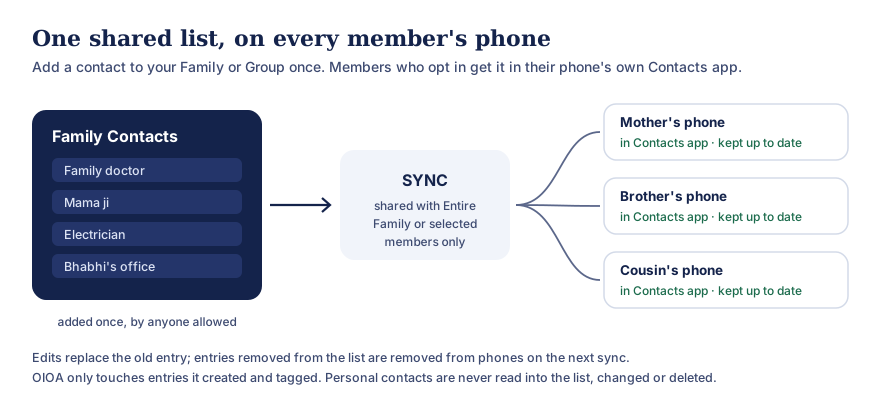
Text version of this diagram
- Anyone allowed to post adds a contact to the Family or Group list once.
- On SYNC, the list is shared with the entire Family or Group, or only with selected members.
- On each member’s phone, if they have turned on phone contact export, the entries appear in the phone’s own Contacts app and are kept up to date.
Edits replace the old entry. Entries removed from the list are removed from phones on the next sync. OIOA only touches entries it created and tagged itself; personal contacts are never read into the list, changed or deleted.
Posting rules
A group’s owner and admins can choose:
- Allow members to post, for an active committee or a family-and-friends group, or
- Only admins can post, for an announcement-style group such as a society notice board.
Admins can also give posting permission to individual members.
Roles
The creator is the group owner. Owners and admins can invite and remove members, change roles and edit the group. The owner can transfer ownership before leaving, so a group never ends up without someone in charge. A recovery route exists if an owner can no longer act.
Invitations
Invite people by OIOA-ID, or share an invitation via WhatsApp or email. The message explains how to install OIOA and ask for an invitation. Nobody joins a group without accepting.
Safety and moderation
Before posting for the first time, each member agrees to the Terms of Use and Community Guidelines. Wording that is offensive or breaks the policy is stopped before it’s posted, with a prompt to change it. Any member can report an update, an event or another member. Group admins review reports and decide, and the decision is recorded. Users can also be blocked.
You can always leave a group. The shared contacts it put on your phone are removed on your next sync. If something concerns you beyond the group, contact the Grievance Officer through the grievance page.
Built for weak networks
Everything is saved on your phone first. Create an update, an event or a contact without a signal, and it’s marked as waiting. Tap SYNC when you’re connected to share it. If a change can’t be accepted, for example because your posting permission was removed, it’s kept and shown to you rather than disappearing. See OIOA-ID and sync.
Ideas for Groups
- Housing society or residents’ association: admins-only notices, a contact list of maintenance staff and services, and events for meetings and festival celebrations of every community. See the society use case.
- Wedding planning: vendor contacts, the function schedule as events with alarms, and family-only updates for selected members. See planning a wedding together.
- Community associations and committees: volunteer contacts, meeting events and announcements.
- School parents’ groups: teachers’ and transport contacts, and events for meetings and exams.
- Friends and trips: shared contacts for the homestay and the driver, plus departure times as events.
One group, many calendars
Members of a group don’t need to follow the same community. Each person’s Home screen follows the calendar they chose, while the group is a shared space for everyone. A society group can include families who follow the panchang, the Hijri calendar, the Parsi calendar, the Jain calendar and the Nanakshahi calendar, and that’s exactly the kind of togetherness OIOA hopes to support.
Common questions
How many people can be in a group?
Groups are designed for real-world circles, from a few friends to a housing society. If you plan something very large, please tell us so we can help.
Can I share something with only a few members?
Yes. Updates, events and contacts can each be shared with selected members instead of the whole group.
Will group events wake me up at night?
Only if the event is set for that time. You can mute group event alarms on your own phone at any time.
How is a Group different from a Family?
A Family is for relatives and comes with family events, birthdays and links to a family tree. A Group suits any other circle and adds updates, posting rules and moderation.