A calendar that starts from your dates
A wall calendar in an Indian home often has three or four date systems printed on every square. Families read the tithi first, or the Hijri date, or the Roj and Mah, and the English date second. Most calendar apps reverse that, showing only the Gregorian month with a few festivals added.
OIOA’s calendars start from your community’s own months. Each community has a month view laid out in its own calendar, and an English months view one tap away. Every day shows both, so you never have to convert in your head.
The calendars and methods you can choose
You choose your calendar in Settings → Set calendar, and change it whenever you like. Communities are listed alphabetically, and each gets the same care.
Hindu. Choose the regional profile your family follows:
- lunar profiles: North Indian, Gujarati, Maharashtrian, Marwari (Rajasthan), Telugu and Kannada, with Amanta or Purnimanta months where the tradition differs;
- solar profiles: Tamil, Malayalam (Kerala), Bengali, Odia and Assamese, with month names in the regional script.
The month view can follow Hindu (lunar) months, solar months or English months. Each day shows the tithi and when it ends, the nakshatra, yoga and karana, with Adhik months marked. See the Hindu panchang explained.
Islamic. Choose Sunni (moon sighting), Shia (moon sighting), Dawoodi Bohra (Misri, the Fatimid arithmetic calendar) or Makkah (Umm al-Qura). The Islamic day begins at sunset, and the app says so. Dates that depend on moon sighting are shown as provisional until the community confirms them. You can record your own sighting date and choose to keep it or use the community’s. See the Hijri calendar.
Jain. Choose your sect or tradition, such as Shwetamber, Khartargachh, Sthanakwasi or Digamber. Jain months, Sud and Vad, Samvat and the Kalyanaks come from that sect’s published calendar. Where a sect hasn’t published dates for a period, OIOA says so instead of guessing. See the Jain calendar.
Parsi. Choose Shahenshahi, Kadmi or Fasli. Each day shows its Roj and Mah, with the day’s meaning, and the Gahambars. See the three Parsi calendars.
Sikh / Punjabi. Choose Original Nanakshahi (2003) or the SGPC method. The Original calendar is solar and fixed. SGPC dates are stored per year, and the app lists which years are available rather than estimating others. Sangrand, the first day of each month, is marked. See the Nanakshahi calendar.
Day details
Tap any day to see its details for your community: the observances on that date, the panchang elements, Roj meanings or Islamic day notes, and any eclipse with its maximum, noting that local visibility and timings may differ. For Hindu calendars there’s also a list of important dates by category, such as Ekadashi, Purnima, Amavasya, Sankashti Chaturthi, Pradosham, Shivaratri and Sankranti, with a reminder that fasting dates can differ by tradition.
Your own notes, repeating by your calendar
On any day you can add my details: a title and a note, such as “Nani’s birthday” or “Dadaji’s barsi”. Choose how it repeats:
- not at all,
- every year by English date, or
- every year by community date: the same tithi (month, paksha and tithi, with Adhik months kept distinct), the same Hijri date, the same Parsi Roj and Mah, the same Nanakshahi date or the same Jain date.
Text version of this diagram
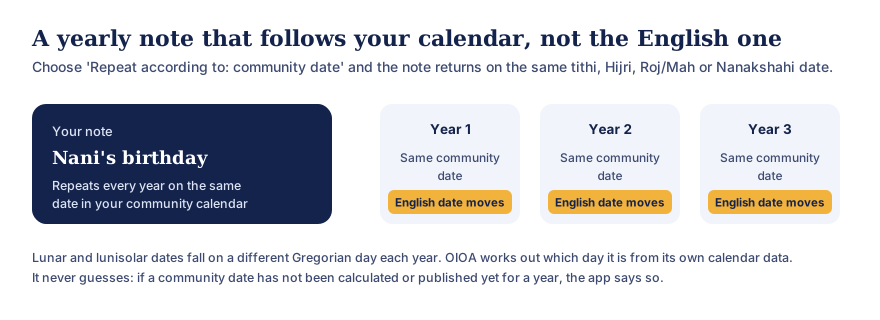
A note such as “Nani’s birthday” can be set to repeat every year according to the community date: the same tithi, Hijri date, Parsi Roj and Mah, or Nanakshahi date. Each year it falls on the same community date while the English (Gregorian) date moves. OIOA works out the Gregorian day from its own calendar data, and if a date has not been calculated or published for a year it says so instead of guessing.
These notes stay on your phone. They’re private and work offline. If the community date for a future year hasn’t been calculated or published yet, the app tells you rather than guessing.
In your language
Month names, tithis, nakshatras and labels appear in your chosen language, and Indian digits can be shown where your language uses them. Urdu and Arabic are laid out right to left.
Works without internet
Hindu dates are calculated on your phone, from the current month up to ten years ahead. Published data, such as Jain sect calendars and SGPC years, is downloaded once and kept. Read how offline calendars work in OIOA.
Common questions
Can I see the English date too?
Yes. Every month can be switched between your community’s months and English months, and each day shows both.
My family follows a different regional calendar. Can I switch?
Yes. Change the profile in Settings at any time. If your tradition isn’t listed, please request it.
Why does the app say a date is unavailable?
Some calendars depend on dates published by a community authority. When those haven’t been published for a period, OIOA shows “unavailable” rather than an estimate that could be wrong.
Does a note that repeats by tithi move every year?
Its Gregorian date does. It falls on the same tithi each year, which can be a different English date. That’s exactly why the option exists.