Two kinds of features, two kinds of data
Most of OIOA is personal and on your phone: calendars, daily timings, muhurat, prayer times, Qibla, holidays, the GST and Zakat calculators, cards, predictions, your personal events and calendar notes. None of that needs an account.
A few features are shared with other people: Family, Family Tree, Groups and shared contacts. Sharing needs two things that personal features don’t: a way to know who is who, and a way to exchange changes between phones. In OIOA those are the OIOA-ID and SYNC.
Your OIOA-ID
An OIOA-ID looks like OIOA-ABCDE. It’s your permanent identity for shared features, and it’s what relatives type in to invite you to their Family or Family Tree.
- Creating one takes your name and a recovery email. That’s all.
- Recovering one on a new phone: choose Claim / Recover, enter your OIOA-ID or recovery email, and open the verification link sent to that email. Then tap SYNC once to restore your Families and Family Trees. Nothing is recreated or deleted in the process.
- Who sees it: people you share with see your name and OIOA-ID in the Families, Trees and Groups you belong to.
If you only use calendars and tools, you never need to create an OIOA-ID.
How SYNC works
Shared features in OIOA are local-first. Every change you make, whether adding a relative, editing a contact, posting an event or accepting an invitation, is saved on your phone immediately and shown at once. It’s marked as pending upload. Nothing waits on the network.
When you tap SYNC NOW:
- Pending changes upload together, in the order you made them.
- The latest shared data is downloaded: what other members have added or changed.
- Shared contacts are reconciled with your phone’s Contacts app, if you’ve turned that on.
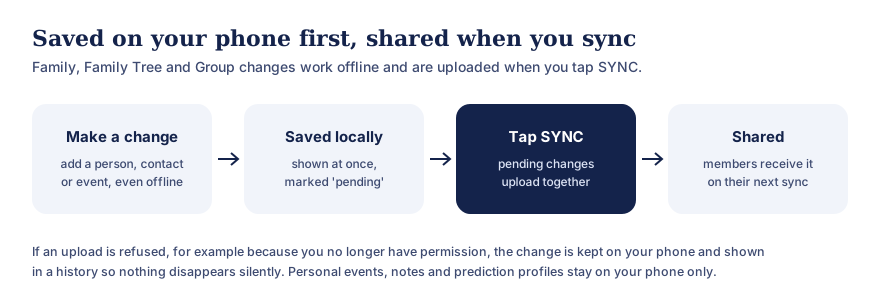
Text version of this diagram
- Make a change: add a person, a contact or an event, even without a connection.
- Saved locally: it shows at once and is marked pending.
- Tap SYNC: pending changes upload together.
- Shared: members receive it on their next sync.
If an upload is refused, for example because you no longer have permission, the change is kept on your phone and shown in a history. Personal events, calendar notes and prediction profiles stay on your phone only.
The SYNC screen shows how many pending uploads you have, when the last pull happened, and when the next pull is available. Downloads are paced, which keeps the service fair and fast for everyone. You can always upload your own changes.
Nothing disappears silently
Networks fail and permissions change. OIOA is designed so that neither costs you data:
- Offline? Changes stay on your phone until a sync succeeds.
- Upload refused? For example if your posting permission was removed, or someone else deleted the item first. The change is kept in a rejected uploads history on your phone, with the reason, rather than vanishing.
- Partial download? OIOA never treats an incomplete download as “everything was deleted”. Shared contacts on your phone are only removed when the app has a complete, verified list.
- New phone? Recover your OIOA-ID and sync. Your Families and Trees come back.
Why local-first?
Indian family life happens in places with patchy signal: a village wedding, a hospital corridor, a pilgrimage, a basement banquet hall. An app that freezes because a server didn’t answer is no help there. Local-first design means OIOA works in the moment, and shares when it can.
It also means you decide when your changes are shared. Nothing is uploaded behind your back while you’re still editing.
What stays on your phone only
These are never uploaded by SYNC:
- your personal events (birthdays, anniversaries, remembrance),
- notes you add to calendar days,
- prediction profiles (birth date, time and place),
- calculator inputs (GST and Zakat),
- cards you make, until you choose to share them.
Your community, language and city selection is used to show the right calendar and, where you allow notifications, to send relevant announcements. The privacy policy explains exactly what is stored with our processors.
Common questions
Do I need an account to use OIOA?
No. Calendars, timings, tools, cards and personal reminders work without one. An OIOA-ID is needed only for shared features.
What if I forget my OIOA-ID?
Use Claim / Recover with the recovery email you registered. A verification link is sent to that email.
Why didn’t my relative see my change yet?
They’ll see it after you’ve synced and they’ve synced. Ask them to tap SYNC on the SYNC screen.
Can I use shared features entirely offline?
You can make changes offline. Sharing them needs a connection, once, when you tap SYNC.