The situation
A wedding brings a new daughter-in-law into the family. Within a week she’s expected to know who Kaka is, which Masi lives in Pune, the family doctor’s number and the driver who takes Dadi to the temple. Someone forwards numbers one by one on a chat app; a few get missed; one is out of date. Six months later a cousin changes his number and half the family never finds out.
The same thing happens when a parent gets a new phone, a child goes to college in another city, or relatives abroad want the family’s numbers handy for a visit.
How OIOA solves it
A Family in OIOA keeps one shared contact list. Every member who turns on phone contact export gets the list in their phone’s own Contacts app, so the numbers work in the dialler, in chat apps and for caller ID. When someone edits a number, it’s corrected on everyone’s phone at the next sync. When a contact is removed, it’s removed from phones too. Personal contacts are never touched.
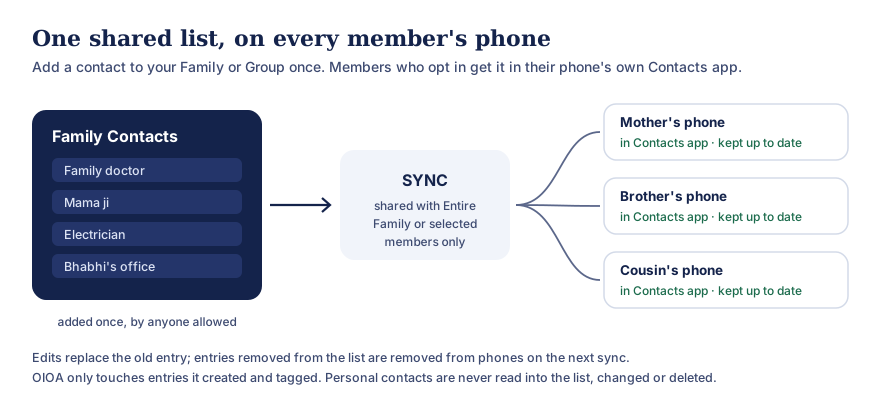
Text version of this diagram
- Anyone allowed to post adds a contact to the Family or Group list once.
- On SYNC, the list is shared with the entire Family or Group, or only with selected members.
- On each member’s phone, if they have turned on phone contact export, the entries appear in the phone’s own Contacts app and are kept up to date.
Edits replace the old entry. Entries removed from the list are removed from phones on the next sync. OIOA only touches entries it created and tagged itself; personal contacts are never read into the list, changed or deleted.
Step by step
- Create the Family, or ask whoever manages it to invite you. Everyone needs an OIOA-ID, which takes a name and a recovery email. See OIOA-ID and sync.
- Add the family’s contacts once. Open Family → Family contacts → New family contact. Add a name and phone number, and optionally a WhatsApp number, email, address and birthday. Choose share with entire Family.
- Tap SYNC to share them.
- The new member joins by accepting the invitation, then taps SYNC.
- They turn on phone contact export for the Family and allow Contacts permission. The whole list appears in their phone’s Contacts app.
- From then on, it stays current. When anyone updates a contact and syncs, the change reaches every opted-in phone on its next sync.
Variations
- Only some people should see a number. Choose share with selected members, for example for an elderly relative’s caregiver’s number.
- Birthdays come too. Birthdays saved on family contacts also appear in the Family’s upcoming birthdays, so the new member knows when to call.
- A big extended family? Create one Family for the immediate household and another for the wider clan. Each member can turn export on or off for each one.
Why it’s better than forwarding
- Nothing is missed. A new member gets the whole list, not just what was forwarded after they joined.
- Nothing goes stale. Corrections reach everyone, so nobody calls an old number.
- Nothing is cluttered. OIOA keeps one tagged entry per shared contact and replaces it when details change, rather than adding duplicates.
- Nothing private is exposed. OIOA never reads your address book into the list. It only manages the entries it created.
A note on consent
The list contains relatives’ details. It’s good practice to let people know their number is in the family list, and to add only what they’d be comfortable sharing with the family. Read the shared contacts page for exactly what OIOA does on your phone.
Related
- Planning a wedding? Use a Group for vendor contacts. See plan a wedding together.
- Want the family’s history too? Start a Family Tree.