Why another family tree app?
Ask an Indian family for its history and you rarely get a neat list of birth certificates. You get a grandfather known by his father’s name, a grandmother whose exact birth date nobody wrote down but whose birthday was always kept on a tithi, and a remembrance day, a shraddh, barsi or death anniversary, that the family observes on its own calendar. Most family tree apps leave no place for any of that. They ask for a date of birth in day-month-year form and stop there.
OIOA’s Family Tree was designed the other way round. It starts with the details Indian families actually hold, and it lets several relatives build the tree together, each joining as themselves.
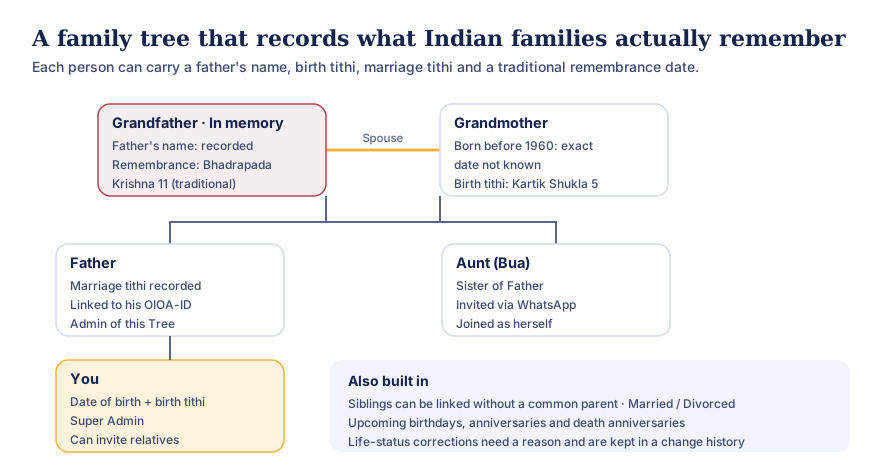
Text version of this diagram
A sample tree with three generations:
- Grandfather, in memory: father’s name recorded; traditional remembrance on Bhadrapada Krishna 11.
- Grandmother, his spouse: born before 1960, exact date not known; birth tithi Kartik Shukla 5.
- Father: marriage tithi recorded; linked to his own OIOA-ID; an admin of the Tree.
- Aunt (Bua), sister of Father: invited via WhatsApp and joined as herself.
- You: date of birth and birth tithi; Super Admin; can invite relatives.
Also built in: siblings can be linked without a common parent; marriages can be marked married or divorced; upcoming birthdays, anniversaries and death anniversaries are listed; life-status corrections need a reason and are kept in a change history.
What each person in the tree can hold
Every person has a first name, father’s name and surname. The father’s-name field isn’t an afterthought. In much of India it’s how people are identified, on documents and in conversation, and it’s often the only way to tell two cousins with the same name apart.
Beyond names, each person can carry:
- Gender and marital status: single, married or divorced, with marriages recorded as a relationship between two people.
- Date of birth, or “born before 1960, exact date not known”. Many elders never had their birth date recorded. OIOA lets you say so honestly instead of inventing a date.
- Janma (birth) tithi: the lunar month, Shukla/Sud or Krishna/Vad paksha and tithi number, with Adhik and Kshaya months handled.
- Marriage date and marriage tithi on the spouse relationship.
- Life status: living or deceased, with the date of death or death tithi if it’s known.
- Traditional remembrance: a separate entry for the month, paksha and tithi on which the family remembers someone who has passed. It’s kept independently, so correcting a person’s other details never erases it.
In the tree view, people who have passed away are marked in memory, so the tree reads as a family’s story rather than a database.
Relationships the way families describe them
You add a person by saying how they relate to someone already in the tree: father of, mother of, son of, daughter of, brother of, sister of, husband of or wife of. Siblings can be connected directly. You don’t need to know or add a common parent first, which matters when you’re recording a great-uncle whose parents nobody remembers.
You can also add a person without a relationship and connect them later, add a spouse relationship between two people already in the tree, and mark a marriage as divorced. OIOA checks that the relationships make sense before saving them. For example, it won’t let someone be their own parent, and it won’t let you mark a person single while an active marriage is recorded.
The tree view shows generations visually: tap a person to see their details, pinch to zoom and drag to explore. A people list and a relationship list give the same information in plain text, which is easier for screen readers and for checking details.
Build it together, as yourselves
A family tree is rarely one person’s work. In OIOA:
- Invite relatives via WhatsApp, email or their OIOA-ID. The WhatsApp message explains what to do in plain words.
- Link each person to their own OIOA account. When a relative accepts, they’re linked to the person who represents them in the tree, so they see the tree as themselves.
- Roles keep it orderly. The creator is the Super Admin, who can make other members admins, restrict who may post, and hand over the Super Admin role when needed. A recovery route exists for families where the Super Admin can no longer act.
- Unlinking is gentle. If someone leaves, their person stays in the tree; only their account link is removed.
Careful with the facts that matter most
Marking someone as deceased, or correcting a death date, is not a casual edit. OIOA asks for a reason of at least 10 characters for life-status corrections, and each person has a read-only change history that shows who changed what. It records server-synced changes from the time the feature was installed, so a family can see how a record came to be, and nothing is silently rewritten.
Dates that come round every year
The tree’s upcoming dates view lists birthdays, marriage anniversaries and death anniversaries from the dates recorded in the tree, with “tomorrow” or “in N days” so nothing catches you by surprise. Pair it with Family events, which ring as an alarm on every member’s phone, and personal events for your own reminders.
Works offline, shares when you sync
Changes to the tree are saved on your phone first and uploaded when you tap SYNC, so you can add people at a relative’s house with no signal and share later. Read how OIOA ID and sync work for the details.
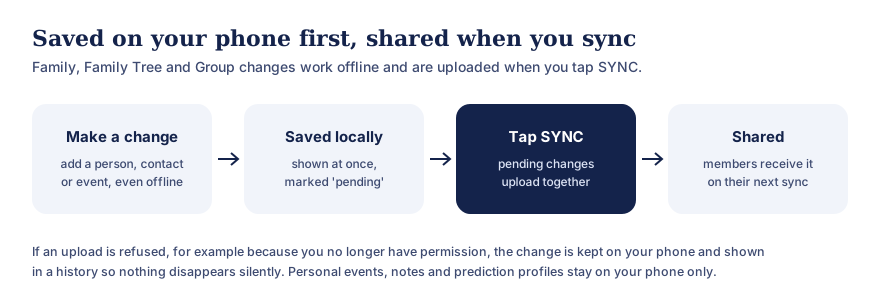
Text version of this diagram
- Make a change: add a person, a contact or an event, even without a connection.
- Saved locally: it shows at once and is marked pending.
- Tap SYNC: pending changes upload together.
- Shared: members receive it on their next sync.
If an upload is refused, for example because you no longer have permission, the change is kept on your phone and shown in a history. Personal events, calendar notes and prediction profiles stay on your phone only.
Privacy
A family tree holds personal data about people who may not use OIOA themselves. Please add details only with the family’s agreement, and treat elders’ and children’s details with special care. Tree data is stored with our processor so that members can share it, and only members of that tree can see it. The privacy policy explains what’s stored, for how long, and how to ask for correction or erasure.
Who it’s for
- Families who want to record elders’ details before they’re forgotten. See the remembering elders by tithi use case.
- Relatives spread across cities who want to build one tree together. See building a family tree together.
- Anyone who keeps shraddh, barsi or death anniversaries and wants the family to remember them on the right day.
- Families that span communities. The Family Tree is the same on every community’s Home screen.
Common questions
Do I need to know everyone’s exact date of birth?
No. Choose “born before 1960, exact date not known” where that’s true, or record only the birth tithi. You can add details later as elders remember them.
Can I record a tithi instead of a date?
Yes. Birth, marriage and death tithis can be recorded with month, paksha and tithi, as well as or instead of a Gregorian date. A separate traditional remembrance entry holds the day the family observes.
Do relatives need OIOA to be in the tree?
No. Anyone can be added as a person. Relatives who do use OIOA can be invited and linked, so they can see and help build the tree as themselves.
Can more than one family tree exist?
Yes. You can belong to more than one tree, for example your own family’s and your spouse’s, and accept invitations to trees others create.
Is it free?
Yes. OIOA has no paid features. See the download page.