The situation
In many families, the dates that really matter were never English dates. A grandmother celebrates her birthday on her birth tithi. A grandfather’s shraddh falls on the tithi on which he passed. A Parsi family keeps a child’s birthday by Roj and Mah. A Muslim family remembers an anniversary by the Hijri date. A Sikh family’s anniversaries follow the Nanakshahi calendar.
These days move against the Gregorian calendar every year, so an ordinary phone reminder, “every 14 March”, gets them wrong. Usually one elder remembers and tells everyone. When that elder is gone, the knowledge often goes too.
How OIOA solves it
OIOA lets you keep a day in the calendar it belongs to:
- On any day in your community calendar, add a note under my details and set it to repeat every year by community date. The same tithi, with paksha and Adhik months kept distinct, or the same Hijri date, Roj and Mah, or Nanakshahi date. OIOA works out which Gregorian day it falls on each year and sends a “Tomorrow” reminder the day before.
- In the Family Tree, record each person’s birth tithi, marriage tithi, death tithi and a separate traditional remembrance entry, so the whole family has the same information.
Text version of this diagram
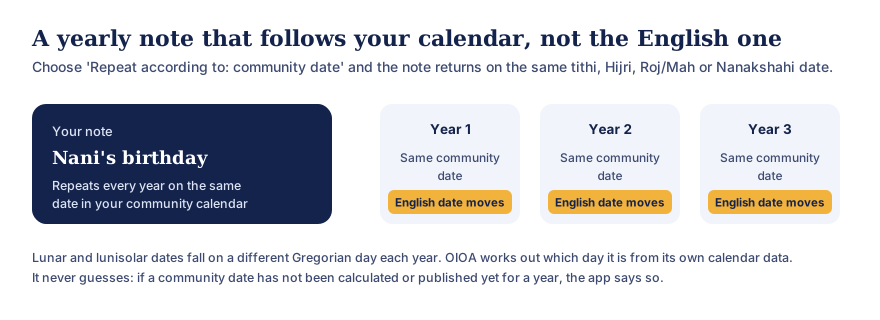
A note such as “Nani’s birthday” can be set to repeat every year according to the community date: the same tithi, Hijri date, Parsi Roj and Mah, or Nanakshahi date. Each year it falls on the same community date while the English (Gregorian) date moves. OIOA works out the Gregorian day from its own calendar data, and if a date has not been calculated or published for a year it says so instead of guessing.
Step by step: a birthday by tithi
- Find the date. If you know the English date of birth, open that day in OIOA’s calendar to see its tithi. If the family already knows the tithi, find the next day it falls on in the Hindu months view.
- Add my details on that day: for example “Dadi’s birthday, call her in the morning”.
- Choose “Repeat every year” → “Community date”.
- Save. Each year, OIOA reminds you the day before, on the right day for that year.
Step by step: a shraddh or barsi
- Open the Family Tree, choose the person, and use Add remembrance.
- Enter the month, paksha (Shukla or Krishna), tithi (1 to 15) and month type (normal, Adhika or Kshaya).
- For your own reminder, also add a calendar note that repeats by community date, with details such as where the family gathers.
- For a family gathering, create a Family event so it rings on everyone’s phone.
Get the tithi rule right
Which day a tithi is “kept” on depends on the tradition, usually the day on which the tithi is current at sunrise (the udaya tithi rule), and shraddh customs have their own rules. Read what a tithi is and the sunrise rule. If your family follows a different custom, follow it, and use OIOA’s calendar to see when the tithi begins and ends.
For every community
The same approach works across OIOA’s calendars: a Roj and Mah birthday in the Parsi calendar, a Hijri anniversary in the Islamic calendar, a Nanakshahi date in the Sikh calendar, or a Jain date by your sect’s calendar.
Private and offline
Calendar notes and personal events stay on your phone. They work without a connection and aren’t uploaded. See reminders and personal events.