Reminders that understand Indian dates
Many of the days Indian families keep don’t fall on the same English date each year. A birthday kept by tithi, a shraddh, a Hijri anniversary, a Parsi Roj birthday or a Sangrand all move against the Gregorian calendar. An ordinary reminder app can only repeat “every 14 March”. OIOA can repeat by the calendar you keep the day in.
There are four kinds of reminders in OIOA. All of them work the same way on every community’s Home screen.
1. Personal events: birthdays, anniversaries, remembrance
In Settings → Personal events you keep your own list of birthdays, anniversaries, remembrance days and other events. Each one has a name, a date and an optional time, and can repeat every year. The list shows what’s upcoming and what’s past.
At the chosen time your phone rings an alarm, not just a silent notification, with Snooze and Dismiss. On recent Android versions, allow Alarms & reminders for OIOA in your phone’s settings so it can ring on time.
Personal events stay on your phone. They aren’t uploaded and don’t need SYNC.
2. Notes on any calendar day, repeating by community date
Open any day in your community calendar and add my details: a title and a note. Then choose how it repeats:
- does not repeat,
- every year by English date, or
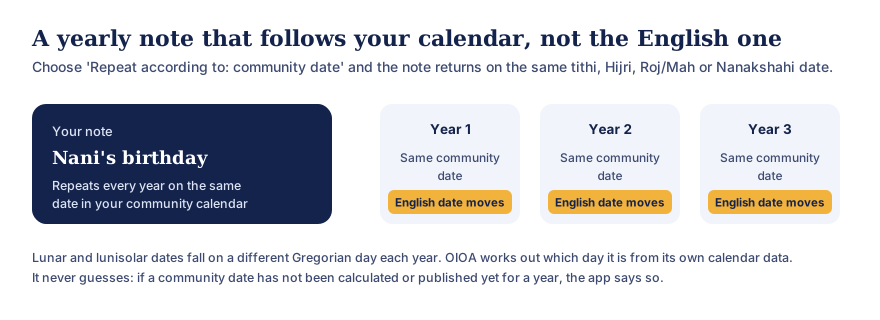
- every year by community date: the same tithi (with paksha and Adhik months kept distinct), Hijri date, Parsi Roj and Mah, Nanakshahi date or Jain date.
Text version of this diagram
A note such as “Nani’s birthday” can be set to repeat every year according to the community date: the same tithi, Hijri date, Parsi Roj and Mah, or Nanakshahi date. Each year it falls on the same community date while the English (Gregorian) date moves. OIOA works out the Gregorian day from its own calendar data, and if a date has not been calculated or published for a year it says so instead of guessing.
OIOA sends a “Tomorrow · my calendar detail” notification the day before, so you have time to prepare. If the community date for a future year hasn’t been calculated or published yet, the app tells you rather than guessing. These notes are private and stay on your phone. See calendars in your community’s months.
3. Important tithi reminders
The Hindu calendar’s important dates list, which covers Ekadashi, Purnima, Amavasya, Sankashti Chaturthi, Pradosham, Shivaratri, Sankranti and more, lets you turn on a reminder for one occurrence or every occurrence. The reminder arrives the day before, worked out for your regional calendar profile. Fasting dates can differ by tradition, and the app notes this.
The Islamic calendar lets you add a reminder on a date with a title and time, saved on your phone.
4. Family and Group events
Events created in a Family or a Group ring as an alarm on every member’s phone, or only on selected members’ phones, with Snooze and Dismiss. Each person can mute one event, or all Family or Group alarms, on their own phone. The Family Tree also lists upcoming birthdays, marriage anniversaries and death anniversaries from the dates recorded in it.
The notification inbox
OIOA keeps a notification inbox so you can see reminders and announcements you may have missed, mark them as read, or clear them. Clearing the inbox doesn’t turn off future reminders.
Getting reminders reliably
- Allow notifications for OIOA when asked, or in your phone’s settings.
- Allow Alarms & reminders on Android 12 and later so alarms ring at the exact time.
- If your phone has aggressive battery saving, allow OIOA to run in the background. Reminders are scheduled again after the phone restarts.
- Keep your phone’s date, time and time zone set to automatic.
Ideas
- Your grandmother’s birthday, kept by her birth tithi, so the family calls on the right day.
- A barsi or death anniversary by tithi or Hijri date, with a note of where the family gathers.
- A child’s Roj birthday in the Parsi calendar.
- A reminder the day before Ekadashi to prepare for the fast.
- A family puja anniversary as a Family event that rings for everyone.
Common questions
Are my personal reminders uploaded?
No. Personal events and calendar-day notes stay on your phone. Only Family and Group events are shared, and only with their members.
Why does a tithi reminder fall on a different date each year?
A tithi is a lunar day, so its Gregorian date changes from year to year. OIOA works out the right day each year from its calendar data.
Can I get a reminder on the day itself?
Personal events ring at the date and time you set. Calendar-day notes and important tithi reminders arrive the day before, so you have time to prepare.
Does it work offline?
Yes. Reminders are scheduled on your phone and don’t need a connection to arrive.