The situation
At a family wedding, the elders start talking about who was whose brother, which village the family came from and what great-grandfather’s father was called. Everyone agrees that “someone should write this down”. The notebook from the last attempt is lost, and the one uncle who knew the most is now in his eighties.
A family tree is the obvious answer, but most family tree tools ask for things Indian families often don’t have, such as exact birth dates and certificates, and they’re built for one researcher, not for a whole family adding what they each remember.
How OIOA solves it
OIOA’s Family Tree is designed to be built together. You start it, invite relatives, and each one is linked to the person who represents them in the tree. They see it as themselves and can add their own branch. Every person can hold the details Indian families actually know: a father’s name, a birth tithi, a marriage tithi, “born before 1960, exact date not known”, and a traditional remembrance date for those who have passed.
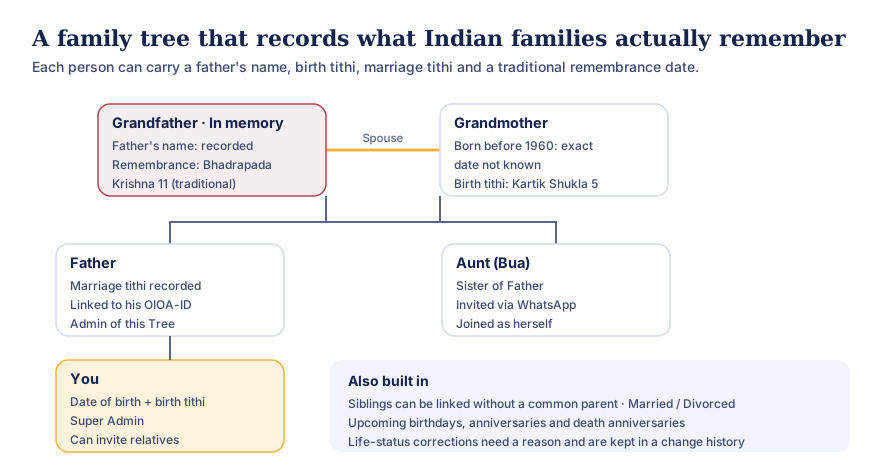
Text version of this diagram
A sample tree with three generations:
- Grandfather, in memory: father’s name recorded; traditional remembrance on Bhadrapada Krishna 11.
- Grandmother, his spouse: born before 1960, exact date not known; birth tithi Kartik Shukla 5.
- Father: marriage tithi recorded; linked to his own OIOA-ID; an admin of the Tree.
- Aunt (Bua), sister of Father: invited via WhatsApp and joined as herself.
- You: date of birth and birth tithi; Super Admin; can invite relatives.
Also built in: siblings can be linked without a common parent; marriages can be marked married or divorced; upcoming birthdays, anniversaries and death anniversaries are listed; life-status corrections need a reason and are kept in a change history.
Step by step
- Create your OIOA-ID (a name and a recovery email), then Create Family Tree. Your own profile needs a first name, father’s name, surname, gender, date of birth and marital status.
- Add the people you know. For each person, choose how they relate to someone already in the tree: father of, mother of, son of, daughter of, brother of, sister of, husband of or wife of. Siblings can be connected without a common parent.
- Record what you know, and say what you don’t. Use the birth tithi if that’s what the family remembers, and choose “born before 1960” where the exact date is unknown.
- Invite relatives. Tap Invite to Family Tree on a living person and choose WhatsApp, email or OIOA-ID. The WhatsApp message explains in plain words how to install OIOA and share their OIOA-ID with you.
- Link them. When they accept, they’re linked to their own person in the tree.
- Share the work. Make trusted relatives admins, and choose who may add or edit. Everyone’s changes are saved on their phone and shared when they tap SYNC.
Tips from families who’ve done it
- Start with the elders. Sit with grandparents and record names, father’s names and the tithis they remember. Their memory is the source no document can replace. See remember elders by tithi.
- Assign a branch to each relative. Bua adds her in-laws’ side; Mama adds the maternal side. It goes much faster than one person doing it all.
- Use the change history. Marking someone as deceased or correcting a death date asks for a reason, and every change is recorded, so the family can see how a record came to be.
- Keep it respectful. Records of the departed appear “in memory”. A traditional remembrance date helps the family keep shraddh, barsi or death anniversaries on the right day.
What everyone gets
- A tree view to explore generations: tap a person for details, pinch to zoom.
- People and relationship lists, which are easy to read and accessible.
- Upcoming birthdays, anniversaries and death anniversaries from the dates in the tree.
- The same tree on every member’s phone, kept in step by SYNC.
Privacy
The tree is visible only to its members. It holds personal details of relatives, some of whom may not use OIOA, so add them with the family’s agreement, and take care with children’s details. See the privacy policy.