The problem every family knows
A new daughter-in-law joins the family and needs forty relatives’ numbers. A cousin changes his number and half the family still has the old one. The society committee keeps a plumber’s and an electrician’s number that new residents ask for every month. Today this happens by forwarding contacts one at a time on chat apps, or by sending a screenshot of a list nobody can tap.
OIOA’s shared contacts solve this in one step. A Family or a Group keeps one contact list, and members who opt in get every entry in their phone’s own Contacts app, so the numbers work for calls, chat apps and everything else on the phone.
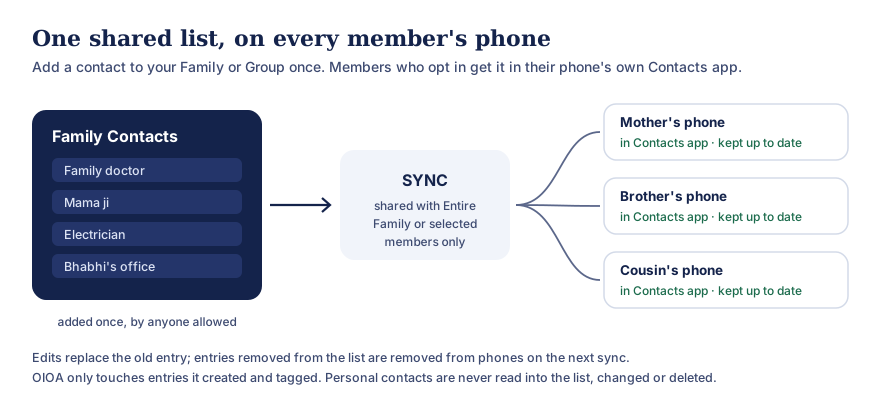
Text version of this diagram
- Anyone allowed to post adds a contact to the Family or Group list once.
- On SYNC, the list is shared with the entire Family or Group, or only with selected members.
- On each member’s phone, if they have turned on phone contact export, the entries appear in the phone’s own Contacts app and are kept up to date.
Edits replace the old entry. Entries removed from the list are removed from phones on the next sync. OIOA only touches entries it created and tagged itself; personal contacts are never read into the list, changed or deleted.
How it works
- Add a contact once. In a Family or Group, anyone who’s allowed to post adds a contact: name and phone number, plus optional WhatsApp number, email, address, birthday and, in groups, notes.
- Choose who sees it. Share with the entire Family or Group, or only with selected members. Selected-member sharing is respected on every phone.
- Tap SYNC. The contact is uploaded and becomes part of the shared list.
- Members opt in on their own phone. Each member decides for themselves whether to turn on phone contact export for that Family or Group. When it’s on, OIOA adds the shared entries to their phone’s Contacts app.
- It stays current. When a contact is edited, the phone entry is replaced with the new details on the next sync. When a contact is removed from the list, or a member loses access, the entry OIOA created is removed from their phone.
That’s the “one tap” part: one person adds a contact, and the whole family has it.
What OIOA will and won’t touch on your phone
We know a phone book is personal, so the rules are strict and built into the app’s code:
- OIOA never uploads your address book. Your personal contacts aren’t read into OIOA or sent anywhere.
- OIOA only changes entries it created. Each exported entry carries an OIOA tag. Before updating or removing anything, the app checks that tag, so it never edits or deletes a contact you saved yourself.
- Export is opt-in, per Family and per Group. You can turn it on for your own family and leave it off for a large group.
- Pausing is safe. If you turn export off, entries already on your phone stay as they are. Nothing disappears unexpectedly.
- Incomplete data is never treated as “delete”. If the app hasn’t finished downloading a list, for example on a poor connection, it doesn’t remove anything. It waits until it has the complete list.
- Updates are made safely. For groups, a new entry is written before the old one is removed, so a failed update never leaves you without the number.
Android asks for Contacts permission before export can work. It’s needed both to add the entries and to find the ones OIOA tagged earlier. If you never turn export on, OIOA never needs that permission. You can withdraw it at any time in Settings → Apps → OIOA → Permissions.
Family contacts and group contacts
Family contacts belong to a Family: the relatives, the family doctor, whoever the family calls on for ceremonies, the tailor who has made every wedding outfit for twenty years. Birthdays saved on a family contact also show in the family’s upcoming birthdays.
Group contacts belong to a Group: a housing society’s plumber, electrician and security desk; a wedding’s caterer, decorator and photographer; a school class’s teachers and drivers. Group contacts can also carry notes, such as “available after 6 pm” or “speaks Gujarati and Hindi”. Only the author or a group admin can edit or delete a group contact.
Why a shared list beats forwarding
- Corrections reach everyone. Fix a number once and every opted-in phone gets the fix.
- New members catch up instantly. Someone who joins the Family or Group gets the whole list, not just what was forwarded after they joined.
- It works with every other app. Because entries live in the phone’s own Contacts app, they show up in your dialler, chat apps and caller ID.
- People who leave stop getting updates. When someone leaves or is removed, the shared entries OIOA created on their phone are removed on their next sync.
Privacy
Shared contacts contain other people’s details, so please add only numbers that the people concerned would be comfortable sharing with your family or group. Shared contact lists are stored with our processor so that members can receive them, and they’re visible only to members you’ve shared with. The privacy policy explains what’s stored and how to ask for correction or erasure, and the grievance page explains how to raise a concern.
Common questions
Does OIOA read or upload my contacts?
No. OIOA doesn’t upload your address book and doesn’t use it to find people. Contacts permission is used only to write, update and remove the shared entries that OIOA itself created and tagged.
Can I share contacts with just a few people?
Yes. When adding a contact, choose share with selected members and pick them. Only those members receive it, in the app and in their phone’s Contacts.
What happens if I leave a family or group?
Its shared entries that OIOA created on your phone are removed on the next successful sync. Contacts you saved yourself, even with the same number, aren’t touched.
Will my phone fill up with duplicate contacts?
OIOA keeps one tagged entry per shared contact and replaces it when details change, rather than adding another copy.
Is this available on iPhone?
Shared contact lists are part of Family and Groups. Phone contact export is described here as it works on Android. Details for the iOS app will be confirmed when it launches; see the download page.