Prayer times without the internet
Salah times are set by the Sun’s position, and that’s something a phone can calculate in an instant. OIOA works out the day’s prayer times on your device for your chosen city, using the method you follow. There’s no daily API and no automatic location tracking, so the times are there in a mosque basement, on a train or abroad without data.
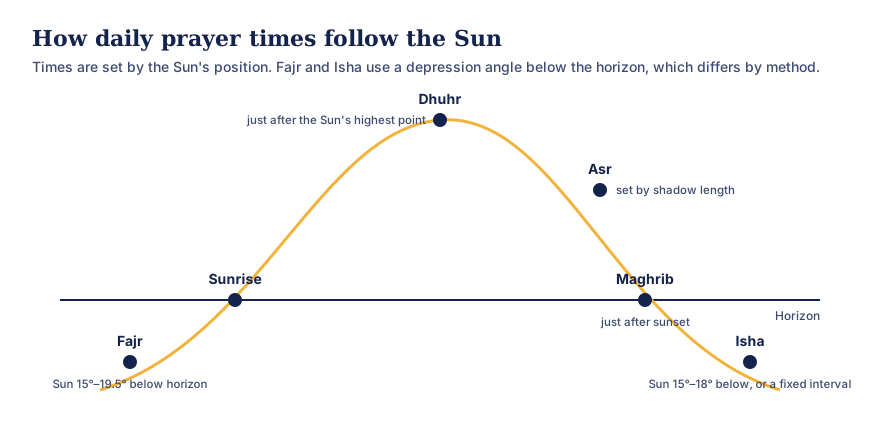
Text version of this diagram
- Fajr: when the Sun is a set angle below the eastern horizon before dawn (commonly between 15° and 19.5°, depending on the method).
- Sunrise: the end of the Fajr window.
- Dhuhr: just after the Sun passes its highest point.
- Asr: when an object’s shadow reaches a set length (the standard rule or the Hanafi rule).
- Maghrib: just after sunset.
- Isha: when the Sun is a set angle below the horizon after dusk (commonly 15° to 18°), or a fixed interval after Maghrib in some methods.
What you see each day
- Fajr, also shown as the time Sehri ends,
- Sunrise,
- Dhuhr, with Zawal, the solar-midday reference,
- Asr, by the school you choose,
- Maghrib, also shown as Iftar,
- Isha.
Under additional calculated times you’ll also find Ishraq and Duha (approximate), Islamic midnight (by method) and when the last third of the night, the time of Tahajjud, begins. Use Next day to look ahead, for example to plan Sehri.
Choose your method
Prayer-time methods differ mainly in the Sun’s angle used for Fajr and Isha. OIOA offers:
- Karachi (University of Islamic Sciences), widely used in South Asia,
- Muslim World League,
- ISNA (Islamic Society of North America),
- Egyptian,
- Umm al-Qura,
- Tehran,
- Jafari / Qum.
And for Asr, choose Standard (shadow equal to the object’s length) or Hanafi (twice the length), which gives a later Asr and is followed by many in India. Read prayer-time methods explained and Hanafi and standard Asr.
At very high latitudes some times can’t be defined astronomically for part of the year. OIOA shows “unavailable at this latitude” rather than inventing a time.
Your mosque’s Jumu’ah time
The Friday prayer is held in the Dhuhr period, but the khutbah and jamaat times are set by each mosque, not by astronomy. OIOA lets you set your mosque’s Friday time so it’s on your screen alongside the calculated times. See Jumma and the Friday prayer time.
Qibla, with your privacy in mind
The Qibla direction is the great-circle bearing from where you are to the Kaaba in Makkah. OIOA shows the bearing from true north and, if your phone has a compass sensor, a live arrow to turn towards.
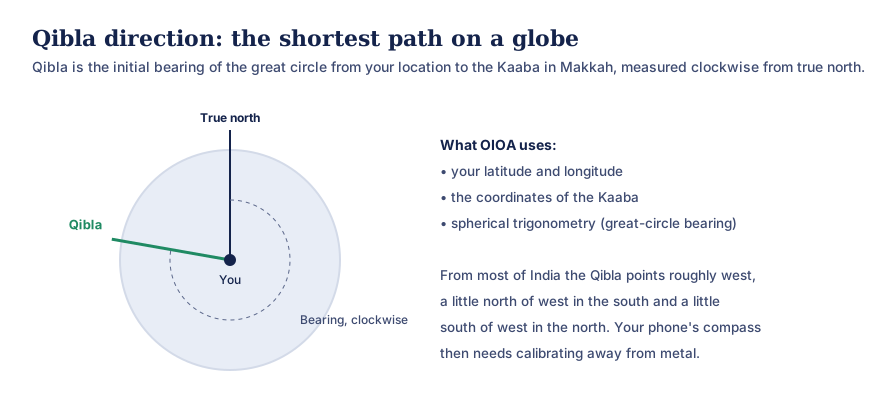
Text version of this diagram
The Qibla direction is the starting bearing of the shortest path over the Earth’s surface (a great circle) from your location to the Kaaba in Makkah. It is measured clockwise from true north and worked out with spherical trigonometry from two pairs of latitude and longitude. From most of India it points roughly west.
Privacy choices in the Qibla screen:
- Each time you open it, OIOA asks where you are finding Qibla from. It doesn’t silently reuse your saved Home city or switch on GPS by itself.
- Choose use my current location, where location is requested once, for this action only, or select a city manually from the built-in list, with no location permission at all.
- The direction updates only while the screen is open.
For accuracy, keep the phone level and away from magnets, speakers and metal. If the phone has no compass sensor, use the true-north bearing with a physical compass. Read how Qibla is calculated.
Part of the Islamic Home screen
Prayer times and Qibla sit on OIOA’s Islamic Home screen with the Hijri calendar, which can follow Sunni or Shia moon sighting, Dawoodi Bohra (Misri) or Umm al-Qura, with provisional and community-confirmed dates. The Zakat calculator is there too, along with cards for Eid greetings and a dedicated Muslim funeral card.
An honest note on accuracy
Calculated times are astronomical estimates. Your local mosque’s timetable may add safety margins or follow a local convention, and that’s the timetable to follow for congregation. OIOA says so on screen.
Common questions
Which method should I choose in India?
Many Indian mosques use timings close to the Karachi method with Hanafi Asr. Check your local mosque’s timetable and pick the method that matches it.
Does it need the internet?
No. Times are calculated on your phone for your chosen city.
Does OIOA track my location for prayer times?
No. Prayer times use the city you’ve chosen. Qibla asks for your location only when you tap “use my current location”, and only once.
Why do Sehri and Fajr show the same time?
Sehri ends when Fajr begins, so OIOA labels that one time for both. Many people stop eating a few minutes earlier as a precaution.