More than a chat group
Most families already have a chat group. It’s good for photos and good wishes, but important things get lost in it: the new phone number, the date of the puja, the time everyone should leave for the wedding. An OIOA Family keeps those things where they belong, as structured information that reaches everyone and stays up to date.
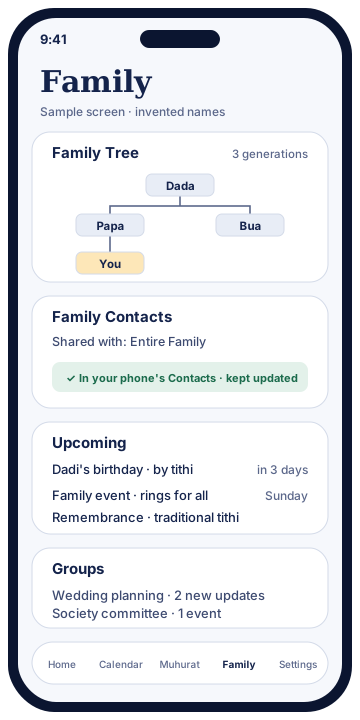
What a Family includes
Family contacts
One shared contact list for the family: relatives, the family doctor, trusted tradespeople. Each contact can hold a phone number, WhatsApp number, email, address and birthday. Share a contact with the entire Family or with selected members only. Each member can choose to have the list exported to their phone’s own Contacts app, where it’s kept up to date and cleaned up automatically. Read the full detail on shared contacts.
Family events
Create an event with a title, date and an optional time, or leave the time blank for an all-day event. Set it to repeat every year for things like a puja anniversary, and share it with the entire Family or selected members. Each member’s phone shows a Family event alarm with Snooze 10 minutes and Dismiss. Anyone who doesn’t want the alerts can mute one event or mute all Family event alerts on their own phone, without affecting anyone else.
Upcoming birthdays
Birthdays saved on family contacts appear in an upcoming birthdays list, so the family’s next celebration is never a surprise.
Family Tree
Alongside your Families you can build a Family Tree, with its own members and invitations. It records what Indian families remember: father’s name, birth, marriage and death tithis, and a traditional remembrance date for those who have passed.
Who can do what
The person who creates a Family is its Super Admin. They can:
- invite members using their OIOA-ID,
- make members admins, or make admins members again,
- allow or restrict posting, so that only some members can add contacts and events,
- rename the Family, remove members, or delete the Family,
- transfer the Super Admin role to someone else, for example when a parent hands over to a child.
If a Super Admin can no longer act, there is a request admin access / recovery route, so a family doesn’t lose its shared space.
Members can leave a Family at any time. They lose access to it, and the shared contacts it put on their phone are removed on their next sync.
Your OIOA-ID
Shared features need a way to know who is who. OIOA uses an OIOA-ID (for example OIOA-ABCDE), which you create with your name and a recovery email. It’s needed only for Family, Family Tree, Groups and shared contacts. Calendars, timings and tools work without one. If you change phones, claim or recover your OIOA-ID and tap SYNC to bring back your Families and Family Trees. Nothing is recreated or deleted. See OIOA-ID and sync.
Works offline, shares when you sync
Adding a contact or an event works even without a connection. Changes are saved locally first and marked as waiting. Tap SYNC to share them. Family members receive them on their next sync. This makes OIOA dependable at a family function in a village with weak signal, and it means nothing is lost if the network drops halfway.
A family across communities
Many Indian families span communities through marriage and friendship. In OIOA each person chooses the community calendar they follow, and the Family is the same shared space for everyone. A Gujarati Jain family, their Parsi in-laws and their Punjabi cousins can share one contact list and one events list, while each person’s Home screen follows their own tradition.
Privacy
A Family’s contacts and events are visible only to its members, or only to the selected members you choose. They are stored with our processor so they can be shared. Please add relatives’ details with their agreement. The privacy policy explains what’s stored, for how long, and your rights to correction and erasure.
Common questions
How is a Family different from a Group?
A Family is for relatives. It has family contacts, family events, birthdays and a family tree. A Group is for any other circle, such as a housing society, a wedding committee, friends or a school class. It has updates, events, shared contacts and moderation tools.
Can I be in more than one Family?
Yes, for example your parents’ family and your in-laws’. Each has its own contacts, events and tree.
Do relatives need to install OIOA?
To be a member, yes, with an OIOA-ID. But anyone can appear as a contact or as a person in the family tree without installing the app.
Are family events the same as personal reminders?
No. Personal events stay on your phone only. Family events are shared with the Family, or with selected members, and ring on their phones too.